The Character and Control of Project Mana
Character and Control
The character of Project Mana is where I spent the majority of my time in development. I knew that the character of my game is what would set it apart and make it recognizable, so I need a strong basis. Fortunately I had one in my previous 2D title, Cepheus Heights.Project Mana initially started as a 3D remake of Cepheus Heights. So, I went in knowing that I wanted to make an in-depth hookshot with multiple unique kinds of grapples in a 3D environment, but I also knew I needed to add something else to keep the game interesting and unique. After thinking back to some of my favorite games, one mechanic came to mind that would both work well with a hook shot and leave plenty of room for exploration. This mechanic was the wall run. After I replayed some of my favorite games with wall running, I found my greatest inspiration from Prince of Persia: The Sands of Time. With my core mechanics decided, I was ready to develop the rest of the character of Project Mana.While considering the character of Project Mana, I knew that freedom was one of the largest aspects of the intended player experience. I wanted my mechanics to reflect this, so the player was granted freedom through the mechanics to explore how they want, where they want, and when they want. However, with the open-ended level structure and freedom of mechanics, the player was bound to run into some difficulties with the player controls. To prevent frustration, I edited and refined the controls to maintain the player’s freedom while protecting the player from themselves. I took this philosophy and made sure that it was present in every mechanic I developed.
The Wall Run And Wall Jump
Wall Run
When playing games with great wall run mechanics the game that stood out the most was Prince of Persia: The Sands of Time. The game had a great way of communicating how long a wall run would last through the curve, and the speed and pace of the animation felt wholly unique to the acrobatic prince’s character. However, I found it would have to be reworked heavily to fit with my intended player experience. I wanted to give the player movement options that opened up the world, so each factor of the wall run had to be reworked to grant the player agency.In The Sands of Time, wall running could feel restrictive as you could only really use it to solve puzzle's preset by designers. This prevented the player from feeling free to explore with the wall run. I wanted my wall run to feel like it could be used to explore every island in the sky, so I made sure that it granted the player access to anywhere they wanted to go. To do this, I made sure my wall run worked on every vertical surface and worked along all sorts of curves. Then, inside the level, I presented as many possibilities to use the wall run as I could.The Sands of Time also required player input to trigger a wall run. This didn’t jive with the sensation of dynamism I wanted to grant to players. I wanted my character to feel smooth and adapt naturally to the environment rather than wait for the player to input for every action. To ensure that the character of the game felt reactive, I made the wall run trigger if the player hit a wall midair. This prevented manual player input and boosted the smooth feeling of the character. This struck a nice balance between player intention and character reaction.While playing Prince of Persia: The Sands of Time I noticed that the game had a great way of communicating how long a wall run would last. The prince runs along a symmetrical curve that can be easily read up close or from a distance. This curve made the run stand out against other games with wall runs such as Spider-Man. I wanted to rework this system for my game. This way, the player could intuit how much longer the run would last so that they could time their jumps. In addition to the curve, I intentionally let the player run down along the curve for just a bit longer than it took for them to run up it. This gave them just that bit of extra time to trigger a jump so that it functioned similar to coyote time.I exposed a lot of variables so that I could fine tune the wall run curve of the character. These variables allowed me to control how fast the player runs along the wall, the total duration of the wall run, how high the player moves along the curve of the run, and how far along the curve pattern the player runs. I tested my wall run all over the environment and fine tuned the run with my intended c-shaped curve in mind. After constant testing, I finally settled on some numbers I felt confident in.
Players follow a curve along the wall and can use the the hookshot to extend their run.
Wall Runs can be chained with Zip-To-Point Latches to access new islands.
Wall Runs can be chained with Swing Latches to for horizontal space
Wall Jump
During a wall run, the player can trigger a wall jump at any time. At the start of a wall jump, I rotated the player so that they’ll immediately start a wall run along both adjacent walls and walls rotated at a 90 degree angle. This allowed the player to continue their wall run both for straightaways and corners. The player could start a wall run streak and hop from island to island in one slick movement. This chaining movement heavily contributed to the feeling of smooth movement I wanted to create.I also made the velocity of a wall jump directly tied to a curve. This way, I could fine tune the feeling of an immediate burst of speed like the player suddenly kicked off the wall. By using a curve, I was able to edit the velocity to recreate the exact feeling I wanted.I tied the direction of the wall jump to the player input. If the player is holding forwards, they will still push away from the wall, but they will move in the direction of the input. If the player is holding in the direction away from the wall they are running on, they will launch themselves directly away from that wall. This way, the player is given more control to land exactly where they want to when they trigger a wall jump.
Players can hop from wall to wall to extend their jump.
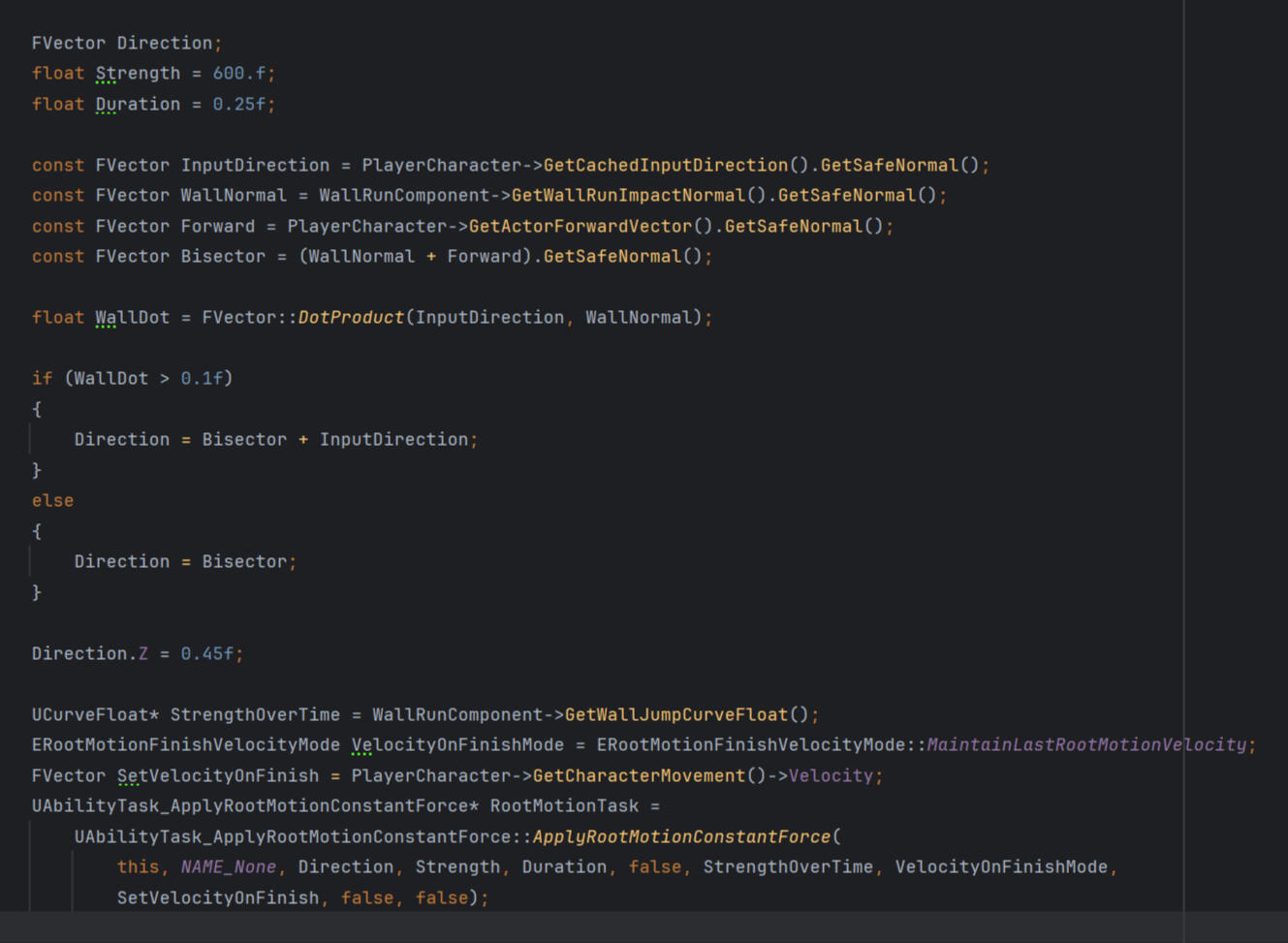
Code Screenshot showing how the input, curve, and normal of the wall make the wall jump work.
The Hookshot and The hooks
Pendulum Hook
The Pendulum Hook latches the player to a hook and puts them into a swinging state. This state turns the player into a pendulum swinging from a hook. The player has control of the yaw of the player during the swing. This way, they can control their horizontal direction and time their swing to control their vertical direction. They can press backward and forward on the control stick to change their speed. This grants them the freedom to move along any axis at any speed in a novel way compared to the rest of the game. It was important to match player input with expectation. Play testers wanted to be able to control both their speed and their orientation, so I mapped them both to the same thumb stick.If the player jumps, the swing will cancel, and they will be launched in the direction of their swing. I made sure to add some upward velocity to the player so that they would always get an added boost. This boost helped the player access higher points if they needed just a bit more vertical space to reach that point. Due to the powerful nature of the jump, the player is granted access to even more of the world.During swinging, if the player collides with any surface, the swing ability will automatically cancel and return the player back to their original state. This aspect had to be carefully considered to both keep the player in control of the swing, but also allow them to flow into another state such as a swing jump or wall run. However, due to this collision mode, the player could easily collide with the ground and automatically cancel the swing. This was frustrating for playtesters, so, initially, I decided to only use the swing in wide open areas. However, this was too restrictive on the level design so I had to find another solution.I came up with a system I called “Auto-Push.” Auto-Push shoots 6 raycasts out from the player in every direction. These raycasts return the distance to the nearest surface, and automatically push the player away from that surface. The closer the player is to the surface, the harder the Auto-Push system will force them away. This kept the player from incidentally grazing a surface and canceling the wall run early. I carefully tuned it not to be powerful enough to keep the player from grazing a surface, but not adding enough force to take away player intention. If the player wants to run into a wall to trigger a wall run, then they have every ability to do so.
Pendulum Swing lets the player cross large gaps.
Swinging can be combined with wall running to gain even more movement capabilities.
Auto-Push keeps the player above the floor even when they are low to the ground.
Zip-To-Point Hook
The Zip-To-Point Hook, allows the player to latch on and quickly zip to a hook. I designed this hook to feel snappy and satisfying to cross large horizontal gaps. It is one of the key components of the game as it grants the player freedom to explore virtually anywhere they want within the environment, so the speed had to feel just right. After playing with multiple speed values, I instead decided to have one set time for the hook to last no matter how far the player was. This added consistency to the hook and it gave me the most control as a designer.Every time the player made the choice to latch on, I wanted it to feel like a deliberate choice, so I opted for the zip-to-point hook to be non-cancellable. This also gave me the most control as a designer to determine where the player would land after they hooked. The preset time limit made the hook very quick, so the player would quickly have control returned to them. This way, the player maintained their freedom to explore without losing their control of the character.
The Zip-To-Point Hook is a quick motion that enables the player to explore everywhere
Launch-Up Hook
The Launch-Up hook zips the player to the hook then launches the player immediately up to a higher surface. It’s an extra big jump that grants the player massive air. After the player launches up, they are suspended in air for a brief second so they can decide to hook again, wall run, or fall to the ground below them. The launch-up Hook opens up opportunities to the player and allows for expression of movement. This hook provides more freedom to the player by allowing them to access higher areas and express themselves in new ways. It also gave me control as a level designer and allowed me to explore adding vertical spaces to the level.
The launch up hook opens up the sky's and gave me lots of freedom as a level designer.
Attacks
Moving Attacks
Project Mana needed to allow for simultaneous movement and attacking. This was necessary to maintain the character’s smooth traversal. Otherwise the attacking would make character would feel locked in place and stiff. This could discourage player's from attacking when it's one of the main verbs of the game. I had to allow for moving and attacking while animating the player properly. To achieve this, I used two tricks.First, I added an upper body slot to my Unreal skeleton and played attack montages to only the upper body if they are moving. There are two main reasons for this. First, this would capture crucial torso movement of the attack animation. This made the animations look significantly better. Second, this would overwrite any animation applied to the shield. The player can’t block and attack at the same time, so playing an animation to the entire upper body slot would remove any active shield animation that would make the player look like they are blocking an attack.My second trick is that I created two separate montages: one for attacking while moving, and another for attacking while still. While attacking while moving only played on the upper body slot, attacking while still played on the full body slot.These two montages can be interchanged at any time and they can smoothly transition from one to another. Since the moving montage only applies to the upper body, if I played this animation while the player was still, the attack animation lost all visual power. So, the player had to transition to the still attack animation any time they stopped moving. I programmed it to check every time the player input another attack to transition to between the two animations.
Attacks transition from moving to still to use the full animation.
Cancelable Attacks
In Project Mana, it was an early goal of mine to make attacks cancelable with a roll. This way, the player could always decide when they wanted to move and they wouldn’t be locked into an action they regretted making. If attacks weren’t cancelable, then player movement would be heavily restricted, and they’d lose the smoothness that was at the core of the character. Using the Gameplay Ability System, it was easy to make an ability that could be automatically canceled if another was started.However, one struggle I had was that the player would only launch themselves in the direction that they were facing at the start of the attack. This felt wrong since the player could be holding the control stick in the opposite direction. So, I programmed a system that permanently cached the player’s stick input. This way, when the player canceled an attack, I could use that cached input and launch the player in the desired direction. I also made sure that if there was no input, the player would roll in the direction they were facing. This felt naturally in-line with the player’s expectations.
Attacks can be quickly canceled with a dodge roll
Responses to environment
Lean into turns
To reinforce the turning action, adhere to solid animation principles (as seen in the Animator’s Survival Kit by Richard Williams), and add to extra smoothness to traversal, I added functionality for the player to lean into their turns. This adds a visual indicator to the player’s input and makes their motion all the more clearer. It also removed stiffness in the animation and loosened the player up for more reactive animations. Since the animation blueprint can play multiple montages at once at any time, I had to use an additive animation blend at the very end of the animation blueprint sequence to make sure the lean applied to all animations.
The player leans into turns to enhance animation.
High and Low Mantle
If the player presses against the surface of any mesh with collision in Project Mana, the character automatically performs a mantle check. If they are along an edge, the game will calculate whether it needs to perform a slower high mantle or a quicker and more freeing low mantle. The automatic mantling system gives the player access to more of the world and it evokes the feeling of a character who naturally responds to their environment rather than a rigid one that requires input for every action.
The player changes mantling based on heighth and whether or not they are on the floor.